A family chore list
The jobs that keep a house running, shared with everyone who lives in it. Each one belongs to somebody, and comes back by itself when it is due again.
Start with this list → Start from blank
Free, with no adverts and no app store. The starter list opens in Co-Do for you to check, and nothing is added until you press Add.
Why Co-Do for this
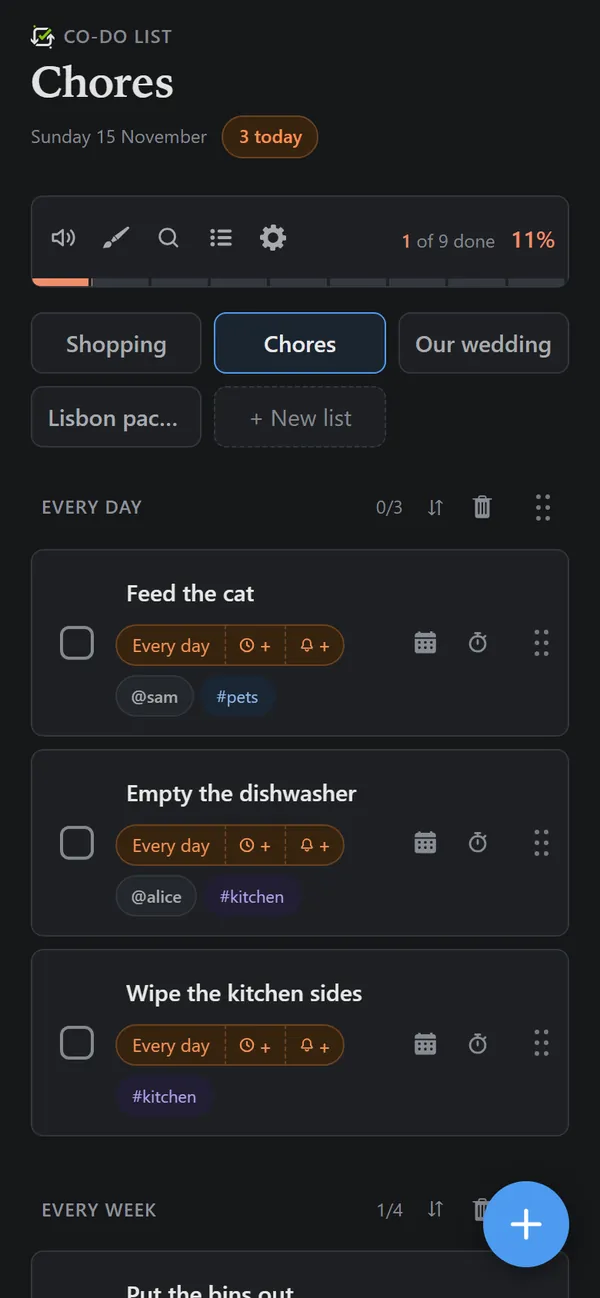
- Jobs that repeat themselves. Tap the calendar on a task, then Repeat: every day, every weekday, every week, every two weeks, every month or every year. Tick it off and it comes back on its next date.
- Everyone knows which jobs are theirs. Write @name on a job to give it to someone. They get a notification when they are given it, and anybody can see only their own jobs with one tap.
- Reminders on the day. Each job can remind whoever it belongs to on their phone, at a time you choose.
- It is satisfying to finish. The box fills, the bar moves, and clearing a whole section makes a noise about it. Children notice that.
- Free, with no adverts. Nothing to buy and nothing to watch before ticking off the bins.
The starter list
Change anything you like once it is in. The names after @ and the tags after # are examples.
Every day
- Empty the dishwasher @sam
- Wipe the kitchen sides
- Feed the pets @sam #pets
Every week
- Put the bins out
- Hoover downstairs
- Change the beds
- Clean the bathroom #bathroom
- Water the plants
Every month
- Clean the oven #kitchen
- Descale the kettle #kitchen
- Clean the shower screen #bathroom
Now and then
- Clear the gutters
- Defrost the freezer #kitchen
- Bleed the radiators
Getting going
- Press Start with this list. Sign in, or choose to use it on this device only, and the list is waiting for you to add.
- Share it from the list menu with everybody in the house, by typing their usernames. Each person needs a free account.
- Give each job to someone by writing @ and picking their name. The starter list uses @sam: swap it for a real username.
- Set a repeat on each job: tap its calendar, then Repeat. Tags such as #kitchen let you see one room's jobs at a time.
Questions
Can a chore repeat every week without picking a date?
Yes. Every day, every weekday, every week and every two weeks start from the next one by themselves. Monthly and yearly repeats ask for the date, because the date is the point.
Does the person a chore is given to get told?
Yes, if they have turned reminders on in Co-Do's settings. They get a notification saying who gave it to them, and it is marked New on their list.
Can children use it?
Anybody with an email address can make a free account. Younger children can also simply look at a shared phone or tablet with the list open.
Other lists to start from
More about the app, and the answers to other questions, on the Co-Do List page.